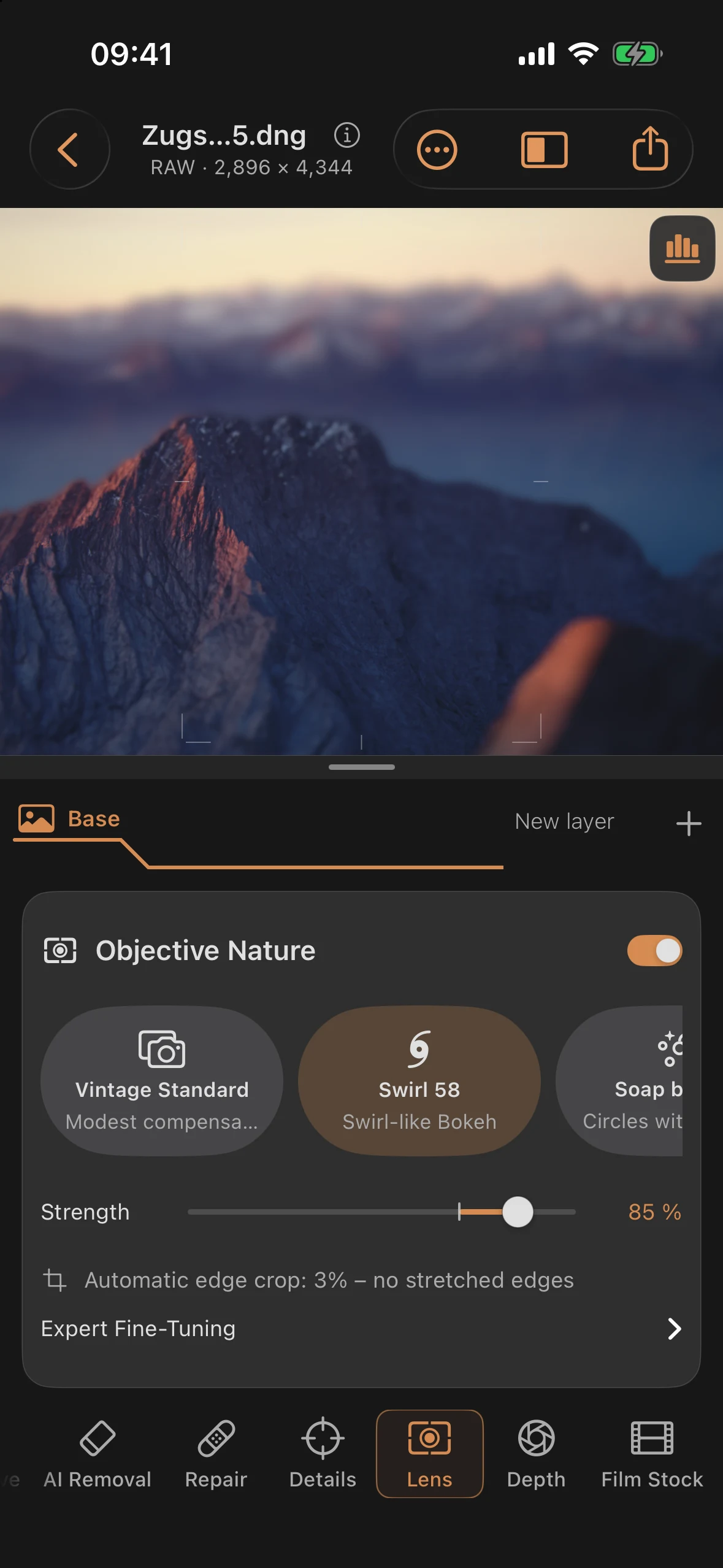
Lens: Simulated Lens Characters
The Lens tool overlays the simulated character of a classic lens onto the image — distortion, color fringes, vignette, glare, and bokeh shapes. It’s explicitly labeled as a simulation:
“Simulated characters of classic lenses: distortion, color fringing, vignetting, glare, and bokeh shapes — inspired by historical optics, fully labeled as simulation.”
On the names: the six presets deliberately carry generic style descriptions instead of manufacturer names — real lens product names are trademarks, so they stay out of the app.
The six lens presets
| Preset | Subtitle | Character |
|---|---|---|
| Vintage Standard | Modest coating | Barely any distortion, slight color fringing, moderate vignette and glare |
| Swirl 58 | Swirl-like bokeh | Visible barrel distortion, strong vignette, swirling bokeh at the edge of the frame |
| Soap Bubble | Circles with emphasized edges | Bokeh circles with a pronounced, ring-shaped edge |
| Soft Portrait | Spherical glow | Pronounced, soft glow over bright areas of the image |
| Plastic Compact | Toy camera | Strong barrel distortion, noticeable color fringing, strong vignette and diffusion |
| Anamorphic | Ovals & streaks | Pincushion distortion, oval bokeh shapes, and horizontal light streaks |
Interplay with depth blur: with Swirl 58, Soap Bubble, and Anamorphic, the bokeh portion of the character needs an active depth blur to come through fully. As long as depth blur is off, the panel shows this for these three presets:
“This character’s bokeh works together with depth blur.”
Controls
| Control | Range | Default | Effect |
|---|---|---|---|
| Strength | 0 to 100% | 70% | Overall intensity of the selected character |
| Distortion (expert) | ×0.00 to ×2.00 | ×1.00 | Multiplier on the preset’s distortion |
| Color fringes (expert) | ×0.00 to ×2.00 | ×1.00 | Multiplier on the preset’s color fringing |
| Vignette (expert) | ×0.00 to ×2.00 | ×1.00 | Multiplier on the preset’s vignette |
| Bokeh (expert) | ×0.00 to ×2.00 | ×1.00 | Multiplier on the preset’s bokeh portion (swirl/soap bubble/squeeze) |
The four expert controls sit behind “Expert Fine-Tuning” and don’t change the base values themselves — they scale them: ×1.00 matches the unmodified preset, ×0.00 turns off that portion entirely, and ×2.00 doubles it.
RAW difference: none.
Activation and edge crop
The lens character is activated via a main “Lens Character” toggle; it only takes effect once Strength is above 0%. When active, the app automatically crops the edge of the image to avoid the stretched or empty edges that distortion would otherwise create. The percentage of this automatic edge crop is calculated and shown live:
“Automatic edge crop: X% — no stretched edges”
Practical tips
- With Swirl 58, Soap Bubble, or Anamorphic, it’s worth setting a depth blur in the Depth tool first — otherwise the preset’s namesake bokeh effect stays largely invisible.
- The expert controls are good for toning a preset down instead of dropping it entirely — for example, Vignette at ×0.50 if you like the preset overall but the corners get too dark.
- A high Strength value also noticeably increases the automatic edge crop — for images that are already tightly cropped, check the live percentage display before exporting.
- Chapter 10 of the tutorial series shows the interplay of the Lens and Depth tools on the sample image “View from the Zugspitze.”